

Frontend Architecture
The RTC Agent frontend is a component library built on Lit Web Components. It exposes only a single <rtc-agent> component to the outside world, containing 57 sub-components internally, managed by 23 Controllers, with data distributed to child components via @lit/context.
Component Architecture
Section titled “Component Architecture”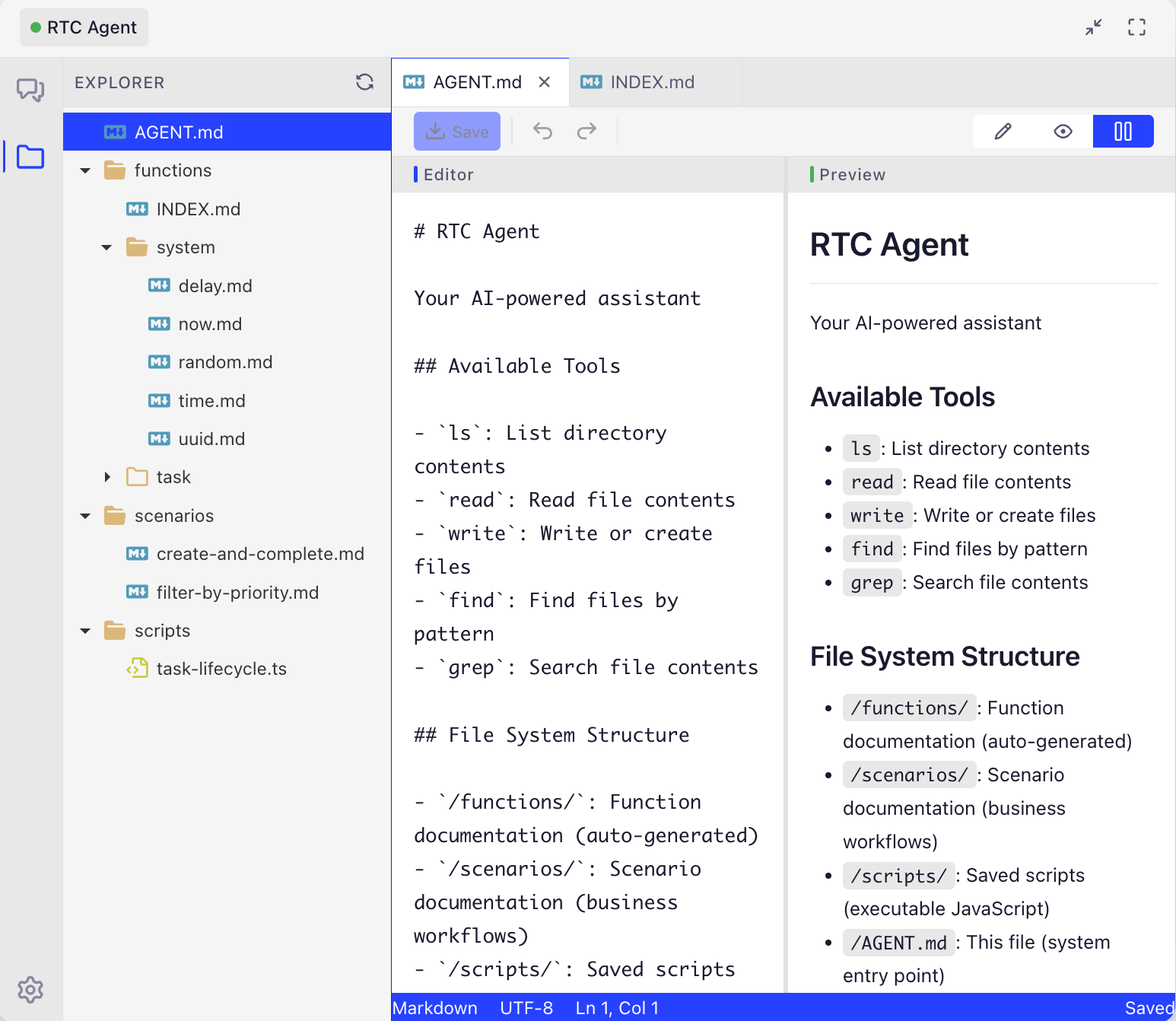
File Explorer: Left panel shows the virtual file system directory tree (functions/, scenarios/, scripts/), right panel is an editor with live preview. All file data is stored in the browser’s IndexedDB.
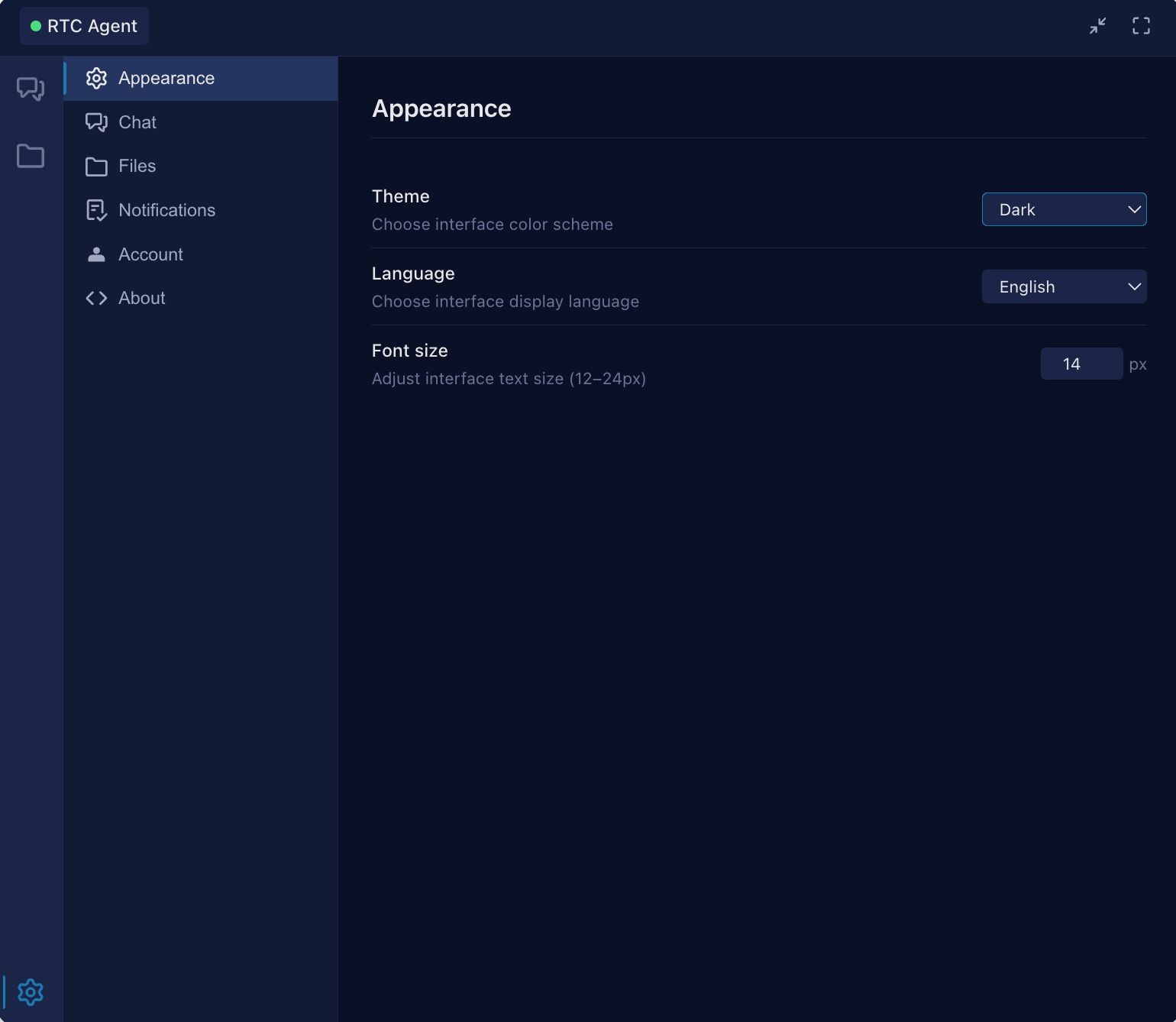
Settings UI: Supports theme switching, language selection, font size adjustment, and other personalization options.
New Components Overview
Section titled “New Components Overview”| Component | Purpose | Replacement |
|---|---|---|
rtc-chat-layout | Two-column chat layout (session tree + content) | Replaces legacy rtc-content-wrapper |
rtc-session-tree | VS Code-style session tree sidebar | New |
rtc-session-tree-item | Tree node (recursive rendering) | New |
rtc-session-tab-bar | Browser-style tab bar | New |
rtc-session-tab | Individual tab | New |
rtc-settings-panel | Settings side drawer panel | New |
rtc-settings-layout | Settings two-column layout | New |
rtc-settings-nav | Settings category navigation | New |
rtc-file-preview-area | Attachment preview area (horizontal scrolling thumbnail list) | New |
rtc-file-thumbnail | File thumbnail (upload progress, delete, preview) | New |
rtc-file-preview-modal | Fullscreen file preview modal (image/text) | New |
Public Component
Section titled “Public Component”Host applications only need to import a single component to access all functionality:
| Attribute | Description | Example |
|---|---|---|
theme | Theme switching | light / dark / system |
lang | Interface language | zh-CN / en-US |
app-label | Title bar text + bubble tooltip | "RTC Assistant" |
database-name | IndexedDB name prefix | "my-app-rtc" |
server-url | Server address | "https://rtc.example.com" |
redirect-uri | OAuth callback address | "/auth/callback.html" |
bubble-icon | SVG/HTML inside the minimized bubble | Custom icon |
logo | Custom brand Logo (separate light/dark variants) | { light: '<svg>...', dark: '<svg>...' } |
worker-url | SharedWorker file URL | "/rtc-agent/shared-worker.js" |
scenarios-url | Scenarios document URL | "https://..." |
agentConfig | Declarative function registration (recommended) | JSON config object |
For detailed API documentation, see Component API.
State Management
Section titled “State Management”New Controllers
Section titled “New Controllers”| Controller | Context | Description |
|---|---|---|
SessionTreeController | SessionTreeContext | Manages session tree structure, expand/collapse state |
NotificationController | NotificationContext | Manages notification state, sounds, focus detection |
SettingsController | SettingsContext | Manages global settings, localStorage persistence |
Additionally, the following auxiliary modules exist:
| Module | Description |
|---|---|
LocaleController / i18n | Internationalization support, runtime language switching |
SessionTabController | Manages tab state (SessionTabContext) |
ToastController | Manages Toast notification display |
Design Principles
Section titled “Design Principles”| Principle | Description |
|---|---|
| Controllers do not reference each other | Each Controller independently manages its own state slice |
| Root component orchestrates | <rtc-agent> acts as the hub, coordinating cross-Controller communication |
| Context distribution | State is distributed to child components via @lit/context, avoiding prop drilling |
| Data layer isolation | The Persistence Controller manages all IndexedDB reads and writes |
💡 Why not global state? Web Components run inside the host application’s page and may have multiple instances. For example, a page might embed both a “Customer Support Assistant” and a “Data Analysis Assistant” as two
<rtc-agent>elements — they need independent sessions, messages, and auth state. Controller + Context ensures each instance’s state is fully isolated with no interference.
File Storage (FileStorage)
Section titled “File Storage (FileStorage)”RTC Agent includes an offline-first file storage system that distributes FileStorage instances to child components via FileStorageContext. All file operations are first written to local IndexedDB cache, then synced to S3 in the background, ensuring availability in offline scenarios.
FileStorage Core API:
| Method | Description |
|---|---|
cacheFileForUpload(file) | Cache file to local IndexedDB, calculate MD5, return FileInfo (including md5, ext, size) |
upload(options) | Upload file to S3, supports onProgress callback, returns FileInfo (including syncStatus) |
download(md5, ext, options?) | Download file, prefers local cache; falls back to S3 on cache miss |
getThumbnailUrl(identifier) | Get image thumbnail URL (returns blob URL, must call releaseThumbnailUrl() to release) |
getPresignedUrl(identifier, expires) | Get S3 presigned URL (for fallback scenarios) |
list(filter?) | List files with pagination and filtering support |
delete(identifier) | Delete file (both local cache and S3) |
getCacheStats() | Get cache statistics (file count, space usage) |
Offline-First Features:
- File uploads are first written to local cache (
syncStatus: 'pending'), thumbnails are immediately visible - When network recovers, files are automatically synced to S3 in the background (
syncStatus: 'synced') - Downloads prefer local cache; only requests S3 on cache miss
- Supports interruption recovery:
resumeInterruptedUploads()resumes incomplete upload tasks
Window System
Section titled “Window System”| Interaction | Implementation |
|---|---|
| Drag | Title bar serves as the drag handle |
| Resize | 8 resize handles — 4 corners + 4 edges |
| Keyboard | Arrow keys to move, Shift to accelerate |
| Viewport constraint | Always stays within the visible area |
Style System
Section titled “Style System”| Layer | Content | Customization Method |
|---|---|---|
| Design Tokens | Spacing, typography, border radius, shadows, transitions, z-index | Override CSS variables |
| Color Themes | light / dark color schemes | Switch via theme attribute |
| CSS Variables | Window size, bubble size | --rtc-* prefixed variables |
Key Interactions
Section titled “Key Interactions”Input Area
Section titled “Input Area”File Upload Flow:
- Trigger: Click the attach button to open the file picker, or use
Ctrl+V/Cmd+Vto paste files from the clipboard - Local Cache: Files are first written to local IndexedDB cache (
FileStorage.cacheFileForUpload()), generating a realfileid(inmd5.extformat) - Instant Preview: Thumbnails display immediately (
rtc-file-thumbnailloads from FileStorage cache), no need to wait for S3 upload - Background Upload: Background call to
FileStorage.upload()uploads to S3, showing real-time upload progress (0-100%) - State Management: Each file has three states —
loading(uploading),loaded(success),error(failed) - Retry Mechanism: Failed uploads show a retry button; clicking it re-uploads the file
- Send Condition: The send button is enabled only after all files are uploaded; when sent, the file list is submitted with the message
Message List
Section titled “Message List”| Feature | Behavior |
|---|---|
| Auto-scroll | Automatically scrolls to the bottom when new messages arrive |
| Smart pause | Pauses auto-scroll when the user manually scrolls up |
| New message indicator | Shows a “New messages” button when the user is not at the bottom |
| Rendering | Markdown rendering + code highlighting |
Tool Confirmation Dialog
Section titled “Tool Confirmation Dialog”Command System
Section titled “Command System”When the user types text starting with /, command input mode is triggered:
| Command | Type | Function |
|---|---|---|
/compact | RPC | Manually trigger context compression |
/loop | Local + RPC | Loop execution (scheduled / dynamic) |
/goal | Prompt | Goal-driven; AI sets completion criteria, Judge model checks |
See Commands.
Testing & Quality
Section titled “Testing & Quality”The frontend project adopts a multi-layer testing strategy covering unit tests, integration tests, and end-to-end tests to ensure correct component behavior and stable cross-module collaboration.
Test Infrastructure
Section titled “Test Infrastructure”| Tool | Purpose | Config Location |
|---|---|---|
| Vitest | Unit tests & integration tests | packages/*/vitest.config.ts |
| Playwright | End-to-end tests (E2E) | packages/component/playwright.config.ts |
| jsdom | Browser API simulation (Vitest environment) | test-setup.ts polyfills IndexedDB, matchMedia, ResizeObserver, etc. |
| fake-indexeddb | Pure-JS IndexedDB implementation for Dexie in tests | Auto-imported in test-setup.ts |
Test Scale
Section titled “Test Scale”| Package | Unit Test Files | Description |
|---|---|---|
@rtc-agent/component | 62 | Covers all Controllers, components, factory functions, event system, authentication flows |
@rtc-agent/persistence | 12 | Covers IndexedDB operations, entity repository, transactions, offset manager, script engine |
@rtc-agent/client | 1 | Covers WebSocket client, offset sync, gap-fill logic |
@rtc-agent/worker | 1 | Covers SharedWorker core message routing |
| E2E (Playwright) | 6 | Covers debug API, business flows, advanced interactions, doc reconciliation, script execution |
Currently 835+ unit test cases, all passing.
Running Tests
Section titled “Running Tests”# Run all unit tests (from web-components root)pnpm test
# Run unit tests for the component package onlypnpm --filter @rtc-agent/component test
# Run E2E tests (requires Vite dev server)pnpm --filter @rtc-agent/component test:e2e
# Run a specific test filenpx vitest run packages/component/src/controllers/auth.controller.test.ts
# Watch mode (recommended during development)npx vitestTest Layers
Section titled “Test Layers”Test Utilities
Section titled “Test Utilities”packages/component/src/test-helpers.ts provides test infrastructure:
| Utility | Description |
|---|---|
fixture(template, options?) | Creates a Lit component test fixture, automatically waits for the update cycle to complete |
nextFrame() | Waits one frame to ensure Lit has finished rendering |
cleanupFixtures() | Cleans up all created test fixtures to prevent cross-test pollution |
provideContext() | Injects @lit/context during the setup phase, ensuring context is ready before the component’s first update |
E2E Test Debug API
Section titled “E2E Test Debug API”E2E tests rely on the window.rtcAgentDebug API exposed by the debug page (/debug/index.html). This API is automatically installed in dev mode and provides the following capabilities:
| Method | Description |
|---|---|
waitForReady(timeout?) | Wait for the <rtc-agent> component to be ready |
sendMessage(text) | Send a message |
getSessionController() | Get the session controller |
getActions(controller) | Get a specific controller’s actions |
CI Pipeline
Section titled “CI Pipeline”GitHub Actions CI runs automatically on every push/PR:
pnpm install → pnpm build → pnpm typecheck → pnpm testNode.js version: 24. Tests run on the ubuntu-latest environment.
Performance & Accessibility
Section titled “Performance & Accessibility”Performance Considerations
Section titled “Performance Considerations”| Scenario | Strategy |
|---|---|
| Large message lists | Paginated loading (cursor pagination); first load shows the latest 50 |
| Long conversation scrolling | Virtual scroll optimization (future release) |
| Markdown rendering | On-demand rendering; code highlighting loaded lazily |
| IndexedDB reads/writes | Unified by Persistence Controller; batch operations reduce IO |
Accessibility
Section titled “Accessibility”| Feature | Implementation |
|---|---|
| Keyboard navigation | Tab to switch focus, Enter to activate, Esc to close dialogs |
| ARIA labels | All interactive elements have aria-label |
| Screen reader | Message list uses role="log"; new messages announced automatically |
| High contrast | Supports system high-contrast mode |
Next Steps
Section titled “Next Steps”- Backend Architecture — Learn about the Go server’s layered design
- Architecture Overview — Return to the architecture panorama
- Remote Tool Calling — Learn about the core protocol for frontend tool calling
- Virtual File System — Learn about the frontend IndexedDB file system
- Commands — Learn about the complete command system