

Messaging
Messages are the medium for user-AI interaction. Users send messages and the AI streams responses, with support for Markdown rendering, code highlighting, thinking process display, and tool call cards — the entire process is visible in real time.
Message Types
Section titled “Message Types”| Type | Description | Rendering |
|---|---|---|
| 💬 User Message | Content entered by the user | Plain text |
| 📝 AI Reply | Text generated by AI | Markdown + code highlighting |
| 🧠 Thinking Process | AI’s reasoning process | Collapsible, Markdown rendered |
| ⚙️ Tool Call | Tool requested by AI for execution | Input/output cards |
| 📄 Summary | Compressed summary after context compaction (summary) | Markdown rendered |
| 📃 Plain Text | Unformatted text content (text) | Plain text |
| 🔧 Tool Message | Independent tool role message (tool role) | Input/output cards |
| 📩 User Message | User input with embedded scenarios for injection (user_message) | Plain text + scenario tags |
| 📜 System Prompt | Persisted system-level instructions (prompt) | Not directly rendered |
| ℹ️ System Message | System notifications | Plain text |
MessageRole has 4 types:
user,assistant,system,toolContentType has 9 types:text,markdown,summary,thinking,toolcall_input,toolcall_output,user_message,error,prompt
Message Sending Flow
Section titled “Message Sending Flow”Messages use a local-first strategy: stored locally first for immediate display, then synced asynchronously in the background. After sending a message, the user sees it appear in the UI with zero wait.
Send Failure Handling
Section titled “Send Failure Handling”| Sync State | User-Visible Behavior |
|---|---|
pending | Message shows sending animation |
synced | Message displays normally |
failed | Message shows failure marker + 🔄 retry button |
💡 Retries use the same
client_id, and the server idempotently deduplicates, so no duplicate messages are produced.
Turn State Machine
Section titled “Turn State Machine”Each AI processing cycle constitutes a Turn, which has a well-defined lifecycle:
| State | Meaning | User-Visible Behavior |
|---|---|---|
Pending | Waiting to execute | Message shows “Processing” |
Running | Currently executing | AI streams output, tool cards flash |
Interrupted | Waiting for tool execution | Tool card shows “Executing” |
Completed | Normal completion | AI reply fully displayed |
Failed | Execution failed | Error message shown |
Cancelled | User cancelled | Stopped marker shown |
Merged | Merged into another turn | Not displayed separately |
Streaming Messages
Section titled “Streaming Messages”AI replies arrive token by token in a stream, so users don’t have to wait for the complete response:
Streaming messages are transmitted via dual channels:
| Channel | Purpose | Characteristics |
|---|---|---|
| Topic Channel | First chunk + final complete message | Persistent, supports offline recovery |
| Live Channel | Intermediate chunks | Non-persistent, low latency, tolerant to loss |
💡 The final complete message is pushed via the Topic channel, so even if intermediate chunks are lost, the complete content is eventually received.
Stopping a Turn
Section titled “Stopping a Turn”Users can stop a running turn at any time:
AI Thinking Display
Section titled “AI Thinking Display”The AI’s reasoning process is collapsed by default; users can expand it to view:
| Feature | Description |
|---|---|
| Collapsed by default | Saves UI space |
| Click to expand | View full reasoning process |
| Streaming animation | Pulse animation effect during generation |
| Markdown rendering | Supports formatted display |
Tool Call Cards
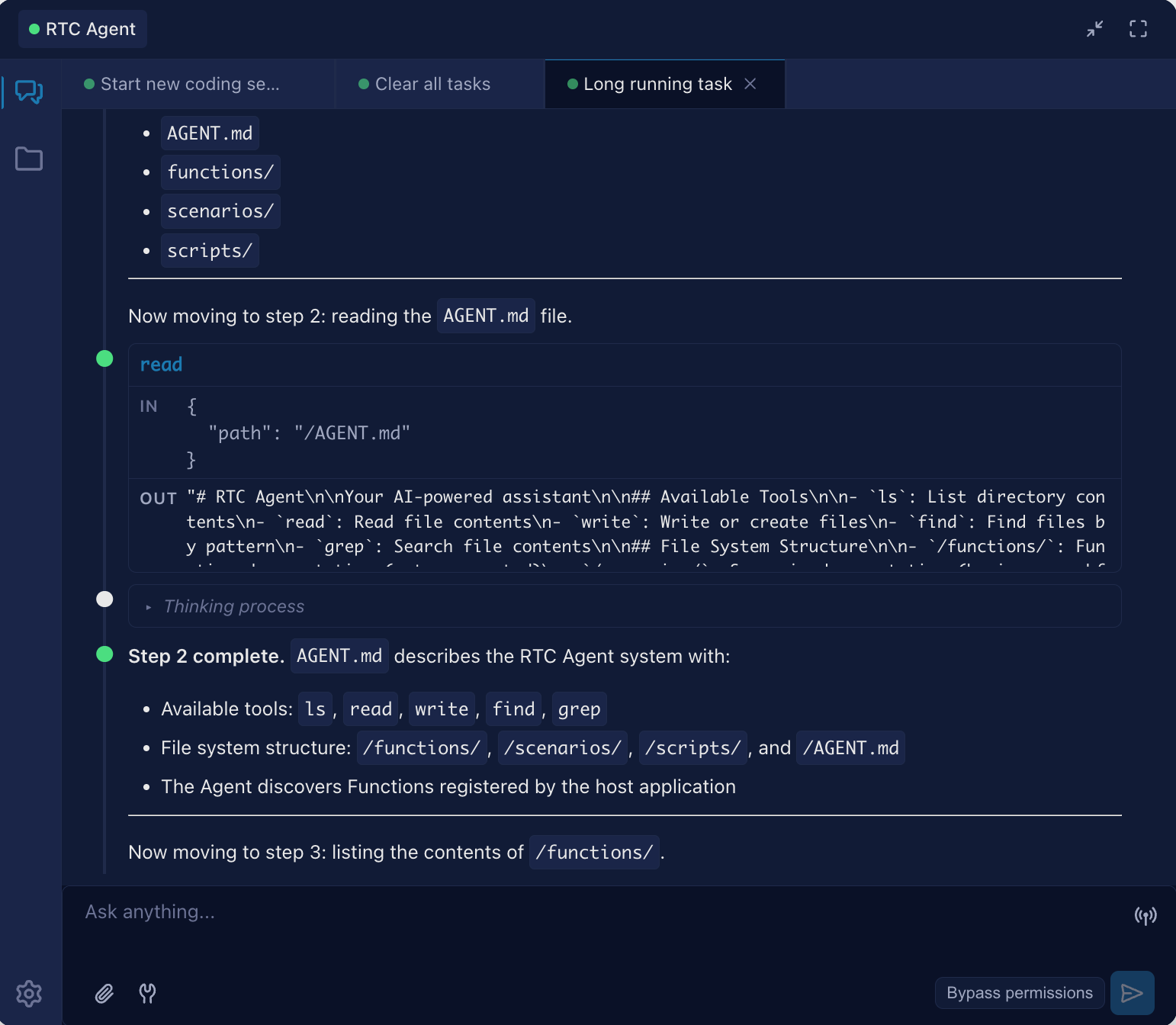
Section titled “Tool Call Cards”Each RTC tool call is displayed as a card with input and output sections:
| Feature | Description |
|---|---|
| Sectioned Display | Input parameters and output results shown independently |
| JSON Formatting | Parameters and results auto-pretty-printed |
| Status Indicator | Running (🟠 orange pulse) / Completed (🟢 green) |
| Copy Button | One-click copy of input/output content |
Message List
Section titled “Message List”| Feature | Description |
|---|---|
| 📊 Sorting | Ascending by send time (oldest first) |
| 📑 Pagination | Cursor-based pagination, loads history from server |
| 📜 Auto-scroll | Automatically scrolls to bottom when new messages arrive |
| 🔔 New Message Alert | Shows ”↓ New messages” button when user scrolls away from bottom |
Message Retry
Section titled “Message Retry”| Scenario | Handling |
|---|---|
| Send failure | Marked as failed, retry button displayed |
| Idempotency | Uses client_id for deduplication; retries produce no duplicates |
| RTC failure | Exponential backoff retry (1s → 2s → 4s → … → 30s cap) |
user_message Content Type
Section titled “user_message Content Type”user_message is the 7th ContentType, supporting scenario injection — embedding structured context within user messages that the server parses and injects as system prompts into the LLM.
Data Structure
Section titled “Data Structure”{ "type": "user_message", "data": { "text": "Please help me create a task", "scenarios": [ { "filepath": "/scenarios/create-task.md", "title": "Create and Complete a Task", "file_content": "# Create Task\n\n..." } ], "files": [] }}| Field | Type | Description |
|---|---|---|
text | string | Message text content |
scenarios | ScenarioRef[] | Scenario list (optional), containing full file content |
files | FileAttachment[] | File attachment list (optional) |
ScenarioRef Structure
Section titled “ScenarioRef Structure”| Field | Type | Description |
|---|---|---|
filepath | string | Scenario file path |
title | string | Scenario title |
file_content | string | Full scenario file content (Markdown format) |
FileAttachment Structure
Section titled “FileAttachment Structure”| Field | Type | Description |
|---|---|---|
fileid | string | File unique identifier (content identifier) |
mimetype | string | MIME type (e.g., image/png, application/pdf) |
extra | object | Extension fields (e.g., name, size) |
File ID Format Specification:
File ID is the unique identifier of file content, in the format {md5}.{ext}:
{md5}: 32 hexadecimal characters (lowercasea-for digits0-9) — the MD5 hash of the file content{ext}: 1-10 alphanumeric characters for the file extension (e.g.,txt,jpg,pdf)
Examples:
- ✅ Correct:
a1b2c3d4e5f6a7b8c9d0e1f2a3b4c5d6.txt - ✅ Correct:
b2c3d4e5f6a7b8c9d0e1f2a3b4c5d6e7.jpg - ❌ Incorrect:
user-550e8400.../a1b2c3d4...txt(should not include user prefix) - ❌ Incorrect:
myfile.txt(MD5 format error)
💡 File ID vs File Key: File ID is the content identifier used by the client (
{md5}.{ext}). The server constructs the full S3 Key when storing:user-{userId}/{fileid}. The client only needs to pass the File ID; the server automatically adds the user prefix for validation and storage.
💡 Injection mechanism: The server extracts scenarios from
UserMessageContent.Scenariosand injects them as system messages with<scenarios>XML tags. The final message order is:[system] Attachments→[system] Scenarios→[system] Command prompts→[conversation history].
File Attachments
Section titled “File Attachments”Users can attach images and text files to messages. The Agent can recognize image content (visual understanding) and read text content, enabling reasoning and responses based on attachment information.
User Operations
Section titled “User Operations”| Operation | Description |
|---|---|
| Attach button | Click the attach icon in the input area toolbar to open the file picker (accepts image/*, text/*) |
| Paste upload | Use Ctrl+V / Cmd+V to paste images or files from the clipboard |
| File preview | Click on an attached file thumbnail to open a full-screen preview modal (images support zoom, text files show content) |
| Upload retry | When file upload fails, click the retry icon to manually re-upload (files are kept in memory, no need to re-select) |
Upload flow: Files are first cached locally (generating a File ID), with thumbnail previews displayed immediately, then uploaded to object storage in the background. If upload fails, an error state and retry button are shown; users can manually retry or continue sending the message (sending with failed attachments is allowed).
Supported File Types
Section titled “Supported File Types”| Category | MIME Type | Max Size | Processing |
|---|---|---|---|
| Images (supported) | JPEG, PNG, BMP, TIFF | 20MB raw / 5MB base64 | Auto-resize to 2000x2000, multi-level JPEG compression |
| Images (unsupported) | WebP, GIF | - | Currently unsupported; please convert to JPEG or PNG |
| Text | text/* | 256KB | UTF-8 validation, truncation if too long |
Image Processing Pipeline
Section titled “Image Processing Pipeline”- Read: Read raw data from object storage (limited to 20MB)
- Detect: Detect actual MIME type via magic bytes
- Decode: Auto-apply EXIF orientation correction
- Fast path: Return as-is if already within size limits
- Resize: Scale to fit within 2000x2000 bounding box using Lanczos algorithm
- Compress: Try JPEG quality 80→60→40→20 until base64-encoded size ≤ 5MB
- Fallback: If still over limit, downscale to 400x400 at lowest quality
- Inject: Embed as base64 in the LLM request’s
imagecontent part
Text Processing Pipeline
Section titled “Text Processing Pipeline”- Read: Read text data from object storage (limited to 256KB)
- Validate: Verify the file content is valid UTF-8 encoding
- Truncate: If over 256KB, safely truncate at UTF-8 character boundary with truncation notice appended
- Wrap: Wrap with XML tags:
<file_content name="filename" type="MIME type">content</file_content> - Append: Append the wrapped text to the user message’s Content field
Send Conditions
Section titled “Send Conditions”| Condition | Description |
|---|---|
| All files uploaded | Send button is disabled when any file is still uploading (loading) or has failed (error) |
| Upload failure handling | Failed files can be retried, or deleted and re-uploaded |
💡 File attachments are submitted with the
user_messagewhen sending. The server loads all files in parallel to improve response speed in multi-file scenarios. When users send multiple consecutive messages with images, the server merges theMultiContent(image content parts) of adjacent same-role messages to ensure all images are recognized by the LLM.
Token Usage Display
Section titled “Token Usage Display”The frontend uses the rtc-token-usage Web Component to display real-time token consumption and cost information in the input area toolbar.
Display Items
Section titled “Display Items”| Display Item | Data Source | Description |
|---|---|---|
| Circular Progress | compression_progress | Current context as percentage of compression threshold |
| Total Tokens | total_tokens | Cumulative total token count |
| Total Cost | total_cost_usd | Cumulative cost in USD |
| Input/Output | total_input_tokens / total_output_tokens | Categorized token statistics |
| Cache Hit Rate | cached_read / input | Cache reads as percentage of total input (capped at 99%) |
| Estimated Next Round | estimated_next_round_tokens | EWMA-based prediction for next round |
| Compression Countdown | rounds_until_compression | Rounds remaining until auto-compression |
Protocol Field Mapping
Section titled “Protocol Field Mapping”Snake_case fields from the backend session.updated event are mapped to frontend camelCase properties:
| Protocol Field (snake_case) | Frontend Property (camelCase) | Description |
|---|---|---|
current_context_tokens | currentContextTokens | Current context token count |
estimated_next_round_tokens | estimatedNextRoundTokens | Estimated next round tokens (circle progress numerator) |
compression_threshold | compressionThreshold | Compression trigger threshold (circle progress denominator) |
compression_progress | compressionProgress | Compression progress (0-100) |
rounds_until_compression | roundsUntilCompression | Rounds until compression |
total_tokens | totalTokens | Cumulative total tokens |
total_cost_usd | totalCostUsd | Cumulative cost |
Circular Progress & Color Thresholds
Section titled “Circular Progress & Color Thresholds”Circle progress formula: estimatedNext / compressionThreshold * 100%
| Progress Range | Color | Meaning |
|---|---|---|
| < 50% | 🔵 Blue | Context is plentiful |
| 50% - 70% | 🟡 Yellow | Approaching compression threshold |
| > 70% | 🔴 Red | Compression imminent |
💡 When
roundsUntilCompressionis within 0-3 rounds, the tooltip footer shows “X rounds until compression (Y%)”; at 1 or fewer rounds, it escalates to warning color.
Next Steps
Section titled “Next Steps”- Session Management — Learn about the session container that holds messages
- Remote Tool Calling — Learn about the mechanics behind tool call cards
- Real-time Communication — Learn about the dual-channel architecture for streaming messages