

Peep — Chinese Metaphysics Workbench
Peep is an all-in-one Chinese metaphysics workbench — integrating person profiles, documents, Ziwei Doushu, Da Liu Ren, Liu Yao, and a knowledge base. We embed rtc-agent as a Web Component into the React app, letting the AI call business APIs directly:
- 🧑 “Create a profile for Zhang San” → calls
PersonCreate, jumps to the detail page - 🔮 “Read Zhang San’s Ziwei chart, check this year’s fortune” → calls
ZiWei/GetScopeData, renders the chart - 🎲 “Cast a hexagram — should I switch jobs soon?” → calls
LiuYaoCreate, displays the hexagram - 📚 “Write a study note about the Life Palace” → calls
WikiCreate, jumps to the editor - 📅 “What’s today’s date in the lunar calendar?” → calls
SolarToLunar, returns the lunar date
The AI doesn’t just chat — it reads data, invokes functions, and drives the UI.
Product Preview
Section titled “Product Preview”The video above (4x speed) shows the full workflow: user interacts with the AI via natural language to create profiles, cast charts, divine hexagrams, and manage documents.
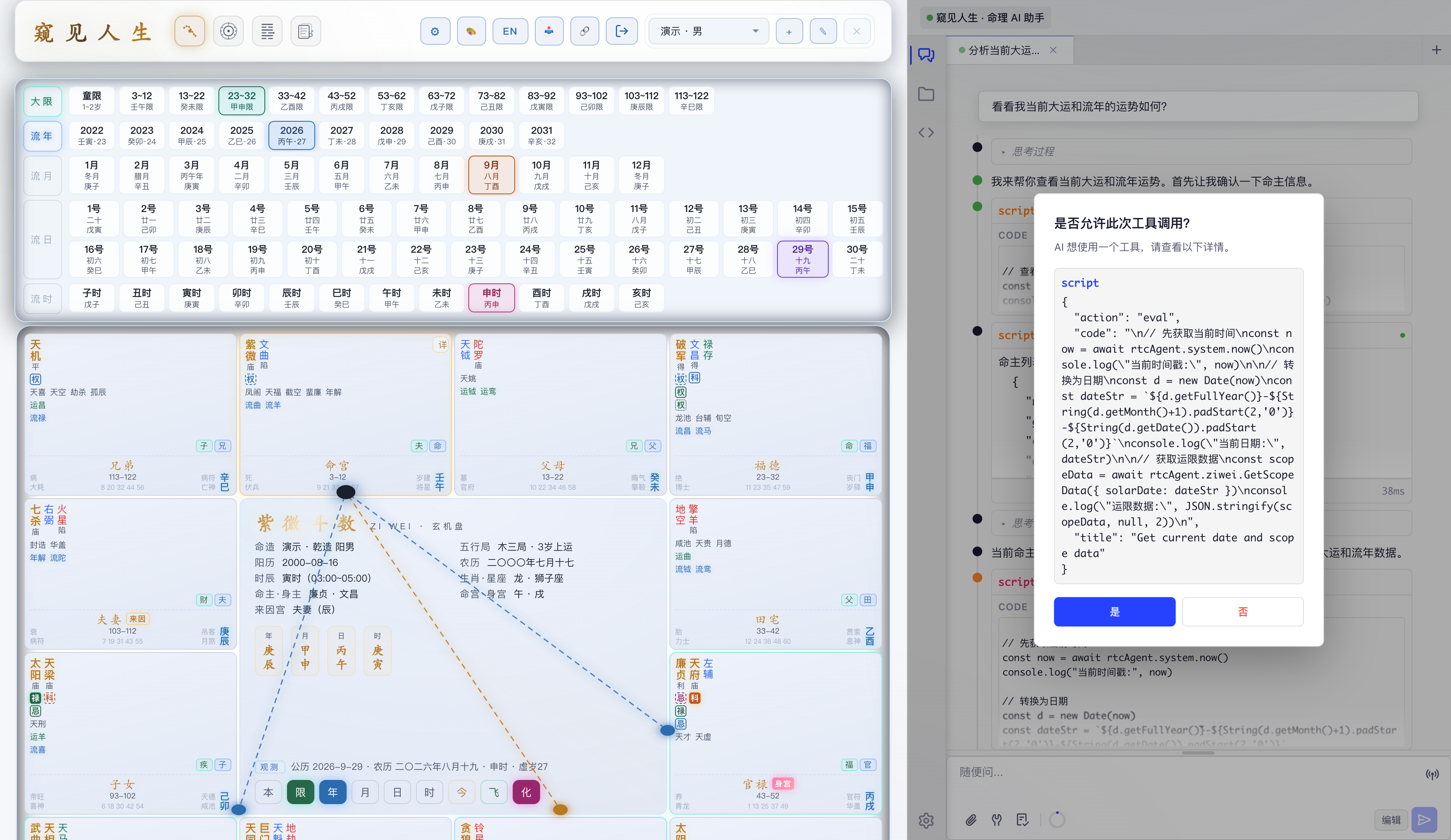
The screenshot shows the Peep main interface: left 5 parts for the Ziwei Doushu main content area, right 3 parts for the embedded
<rtc-agent>AI assistant panel.
How This Differs from the Mermaid Case
Section titled “How This Differs from the Mermaid Case”If Mermaid Live Editor demonstrates the simplest floating-window integration, Peep showcases production-grade embedded integration:
| Feature | Mermaid Live Editor | Peep |
|---|---|---|
| Framework | Svelte | React 19 |
| Window Mode | Floating window (minimized at bottom-left) | Embedded (5:3 split layout) |
| Auth | Default (rtc-agent built-in) | Custom AuthProvider |
| Business Complexity | Single editor | 6 business domains, 40+ functions |
| Safety Mechanism | None | Write operation confirmation |
| Theme Sync | Svelte $effect | Polling + API sync |
| Language Sync | None | zh-CN / en-US switching |
💡 rtc-agent’s integration is extremely flexible — from the simplest floating window to production-grade embedded integration, all achievable with the same component.
Architecture
Section titled “Architecture”┌─────────────────────────────────────────────────────────────────┐│ Peep (React 19 + Vite 8) ││ ││ ┌────────────────────────────┐ ┌──────────────────────────┐ ││ │ │ │ │ ││ │ Main Content (5 parts) │ │ AI Assistant (3 parts) │ ││ │ │ │ ┌────────────────────┐ │ ││ │ 🧭 Ziwei / Da Liu Ren / │ │ │ <rtc-agent> │ │ ││ │ 🎲 Liu Yao / 📚 Wiki │ │ │ Web Component │ │ ││ │ │ │ │ Embedded Max │ │ ││ │ │ │ │ No close/min │ │ ││ │ │ │ └────────────────────┘ │ ││ │ │ │ │ ││ └────────────────────────────┘ └──────────────────────────┘ ││ ▲ │ ││ │ peepApi() internal channel│ ││ └──────────────────────────────┘ ││ (AI invokes business APIs) │└─────────────────────────────────────────────────────────────────┘Key design decisions:
| Decision | Reason |
|---|---|
| Embedded, not floating | AI assistant is a core part of the app, not an optional plugin |
| Fixed 5:3 ratio | Ensures enough space for charts/documents while keeping the AI panel spacious |
| Disable drag/resize/minimize | Not needed in embedded mode — AI is always visible |
| Custom AuthProvider | Fully delegates to peep’s auth system, shares login state |
| Write confirmation | Prevents AI mistakes from causing irreversible data changes |
Integration
Section titled “Integration”The integration uses npm to install @rtc-agent/component, with changes concentrated in 3 files:
| File | Change | Notes |
|---|---|---|
src/core/rtcAgent.ts | Create rtc-agent instance | Configure embedded mode, AuthProvider, function groups |
src/core/rtcAgent/*.ts | Define 40+ functions by business domain | Zod Schema driven, auto-generates OpenAPI docs |
src/App.tsx | Mount into 5:3 layout right side | slot.replaceChildren(agent) |
Step 1: 5:3 Split Layout
Section titled “Step 1: 5:3 Split Layout”The AI panel is a native part of the app, not a floating overlay:
// App.tsx — global layout<div className="rtc-layout"> <div className="rtc-layout-main"> {/* Main content: Ziwei / Da Liu Ren / Liu Yao / Wiki */} <BrowserRouter basename="/peep"> <Layout> <Routes>...</Routes> </Layout> </BrowserRouter> </div> <aside className="rtc-layout-side" aria-label="AI Assistant"> <div ref={rtcSlotRef} id="rtc-slot" /> </aside></div>/* 5:3 split layout */.rtc-layout { display: grid; grid-template-columns: 5fr 3fr; height: 100vh;}Step 2: Create the rtc-agent Instance
Section titled “Step 2: Create the rtc-agent Instance”Use the createRtcAgent factory function, configuring embedded maximized mode and custom AuthProvider:
import { createRtcAgent } from '@rtc-agent/component';import type { RtcAgentWithLifecycle } from '@rtc-agent/component';
export function createPeepRtcAgent(): RtcAgentWithLifecycle {  return createRtcAgent({    appLabel: 'Peep · Destiny AI Assistant',    agentName: 'PeepAstro',    agentDescription: 'Ziwei Doushu · Da Liu Ren · Liu Yao · Wiki — Destiny Analysis AI',    persona: PERSONA_EN, // or PERSONA_ZH, switches with language
    // Embedded mode configuration    window: {      embedded: true,      defaultMode: 'maximized',      draggable: false,      resizable: false,      showMinimize: false,      showMaximize: false,      showClose: false,    },
    // Custom AuthProvider (Mode 3)    auth: {      getToken: async () => {        const tokens = getTokens();        if (!tokens) throw new Error('Not authenticated');        return tokens.access_token;      },      refreshToken: async () => {        const tokens = getTokens();        const newTokens = await refreshAccessToken(tokens.refresh_token);        return {          accessToken: newTokens.access_token,          refreshToken: newTokens.refresh_token,          expiresIn: Math.floor((newTokens.expires_at - Date.now()) / 1000),        };      },      isLoggedIn: () => {        const tokens = getTokens();        if (!tokens) return false;        return !isTokenExpired(tokens, 5 * 60 * 1000);      },      logout: async () => {        clearTokens();      },      getUserId: () => {        const tokens = getTokens();        if (!tokens) throw new Error('Not authenticated');        return tokens.user_id;      },      deviceId: getOrCreateDeviceIdSync(),    },
    // Business function groups (6 groups, 40+ functions)    groups: FUNCTION_GROUPS,
    scenariosURL: `${import.meta.env.BASE_URL}scenarios/`,    workerURL: `${import.meta.env.BASE_URL}rtc-agent/shared-worker.js`,    server: {      url: 'https://rtc-agent.cherish.chat',      redirectUri: `${import.meta.env.BASE_URL}auth/callback.html`,    },    theme: getTheme(),    lang: document.documentElement.lang as 'zh-CN' | 'en-US',    databaseName: 'peep-rtc',  });}
Step 3: Define Business Functions
Section titled “Step 3: Define Business Functions”rtc-agent’s core design is “Agent never touches your source — it operates state through declarative APIs”. Peep drives function definitions with Zod Schema and auto-generates OpenAPI docs the AI can understand:
import { z, withMeta } from '@rtc-agent/component';
export const personCreateFunction = {  name: 'PersonCreate',  description:    'Create a new person profile and auto-switch to that person. ' +    'Example: PersonCreate({ name: "Zhang San", date: "1990-05-15", timeIndex: 4, gender: "男" })',  zodSchema: z.object({    name: withMeta(z.string(), { example: 'Zhang San' }).describe('Person name'),    date: withMeta(z.string(), { example: '1990-05-15' })      .describe('Birth date in solar calendar, format YYYY-MM-DD'),    timeIndex: withMeta(z.number().int().min(0).max(12), { example: 4 })      .describe('Time index 0-12, from early Zi hour (0) to late Zi hour (12)'),    gender: withMeta(z.enum(['男', '女']), { example: '男' }).describe('Gender'),    calendar: withMeta(z.enum(['solar', 'lunar']), { example: 'solar' })      .optional().describe('Calendar type, defaults to solar'),    confirmed: CONFIRM_FIELD, // Write operation confirmation flag  }),  handler: createConfirmHandler(schema, (p) => peepApi().PersonCreate(p)),  returns: {    zodSchema: z.object({      id: z.number().describe('Person ID'),      name: z.string().describe('Name'),      // ... other fields    }),  },};
6 business function groups:
| Group | Functions | Capabilities |
|---|---|---|
person | 6 | Person profile CRUD (List / Get / Create / Update / Delete / SetDefault) |
ziwei | 3 | Ziwei Doushu charting (ZiWei / GetScopeData / SetHoroscopeTime) |
daliuren | 7 | Da Liu Ren divination (Create / List / View / Delete / BatchView / UpdateTags / UpdateNote) |
liuyao | 7 | Liu Yao hexagram (Create / List / View / Delete / BatchView / UpdateTags / UpdateNote) |
wiki | 7 | Knowledge base documents (List / View / Create / Update / BatchView / ReplaceContent / InsertContent) |
lunar | 10 | Calendar calculations (SolarToLunar / LunarToSolar / GetEightCharacters / GetSolarTerms, etc.) |
Step 4: Write Operation Confirmation
Section titled “Step 4: Write Operation Confirmation”For destructive operations like Create / Update / Delete, Peep implements a two-step confirmation mechanism to prevent AI mistakes:
export const CONFIRM_FIELD = withMeta(z.boolean(), { example: true })  .optional()  .describe(    '⚠️ Safety confirmation flag: on the first call, don\'t pass this field; ' +    'the function returns an operation summary for user confirmation. ' +    'After the user confirms, the AI calls again with confirmed: true to execute.'  );
export function createConfirmHandler(schema, handler) {  return async (params) => {    // First call: confirmed not passed, return operation summary    if (!params.confirmed) {      return {        needsConfirm: true,        summary: `About to create person "${params.name}", birth date ${params.date}`,      };    }    // Second call: confirmed, actually execute    return handler(params);  };}
Workflow:
- AI first calls
PersonCreate({ name: 'Zhang San', ... }) - Handler detects
confirmednot passed, returns{ needsConfirm: true, summary: '...' } - AI shows the operation summary to the user, waits for confirmation
- After user confirms, AI calls again
PersonCreate({ ..., confirmed: true }) - Handler detects
confirmed: true, actually executes the creation
💡 This way, even if the AI hallucinates or there’s a prompt injection, irreversible operations won’t execute directly.
Theme & Language Sync
Section titled “Theme & Language Sync”Peep supports light/dark themes and Chinese/English bilingual, which need to stay in sync with rtc-agent:
// Theme sync: polling check (500ms interval)export function startThemeSync(): () => void {  let lastTheme = getTheme();  const timer = setInterval(() => {    const current = getTheme();    if (current !== lastTheme) {      lastTheme = current;      syncTheme(); // Sets agent.theme    }  }, 500);  return () => clearInterval(timer);}
// Language sync: switch via APIexport async function syncLocale(locale: Locale): Promise<void> {  if (!_agent) return;  await switchLocale(locale); // Triggers @lit/localize re-render}
// App.tsx — start syncuseEffect(() => { const agent = createPeepRtcAgent(); slot.replaceChildren(agent); const cleanupThemeSync = startThemeSync(); return () => { cleanupThemeSync(); agent.destroy(); };}, []);
// Sync on language switchconst { locale } = useI18n();useEffect(() => { syncLocale(locale);}, [locale]);Tech Stack
Section titled “Tech Stack”| Layer | Technology |
|---|---|
| Framework | React 19 · TypeScript 6 · Vite 8 |
| Styling | Tailwind CSS 4 · Light/dark themes |
| Components | Radix UI · shadcn/ui · Lucide Icons |
| Data | Dexie (IndexedDB) · Zustand |
| Divination Engines | iztro · lunar-lite · lunar-typescript |
| AI Integration | rtc-agent (npm) · Zod Schema |
| Editor | ByteMD (Markdown + GFM) |
| Testing | Playwright E2E |
| Deployment | GitHub Pages |
Integration Checklist
Section titled “Integration Checklist”Beyond the core files above, the integration also touches:
| File | Purpose |
|---|---|
src/core/rtcAgent/*.ts | Function definitions split by business domain (person / ziwei / daliuren / liuyao / wiki / lunar) |
src/core/auth/AuthContext.tsx | Custom AuthProvider, fully delegated by rtc-agent |
public/scenarios/ | Preset scenario templates + manifest |
public/auth/callback.html | OAuth callback page |
The integration doesn’t modify rtc-agent source at all. @rtc-agent/component is installed via npm and bundled into the host app.
Source Repository
Section titled “Source Repository”Live demo: pineapplebond.github.io/peep